

8th March 2026
What Happens When Your Email Storage Fills Up (And How to Fix it)
Emails not arriving? When email storage fills up, messages stop without warning. Learn what happens, why deleting emails isn’t enough, and how to fix it properly.
Most service-based business owners think of their domain, website, and emails as one single thing. In reality, they are three separate systems that just happen to work together.
This misunderstanding is usually harmless, until something changes:

A new website goes live
Emails stop sending or receiving
You move provider
Storage fills up
A migration to Microsoft 365 is needed
That's when things suddenly feel a bit broken, even though the issue might only be in one place.
Your domain name (for example, www.yourbusiness.co.uk) is simply an address. It doesn't:

Store your website
Hold your emails
Contain any content
Its only job is to point people and systems in the right direction. This is why, if a domain is pointing to the wrong place:

Your website might not load
Some people see the old site, others see the new one
Emails can suddenly stop working
The domain hasn't broken, it's just giving the wrong directions.
Here's the easiest way to visualise what's actually happening when your website moves or when a new one goes live - it's an analogy I use all the time with clients.
Your website is just a bunch of files.
Think of the server as a car park. Your website files are the cars parked in that car park.
Your domain name is the street sign. When someone types your website address into their browser, that street sign tells them which car park to go to.
Right now, your website might be parked in one car park. When a new website goes live, all we do is move the car to a new car park and update the street sign to point there instead.
That's it. No mystery, just directions being updated so your visitors always find the right place.
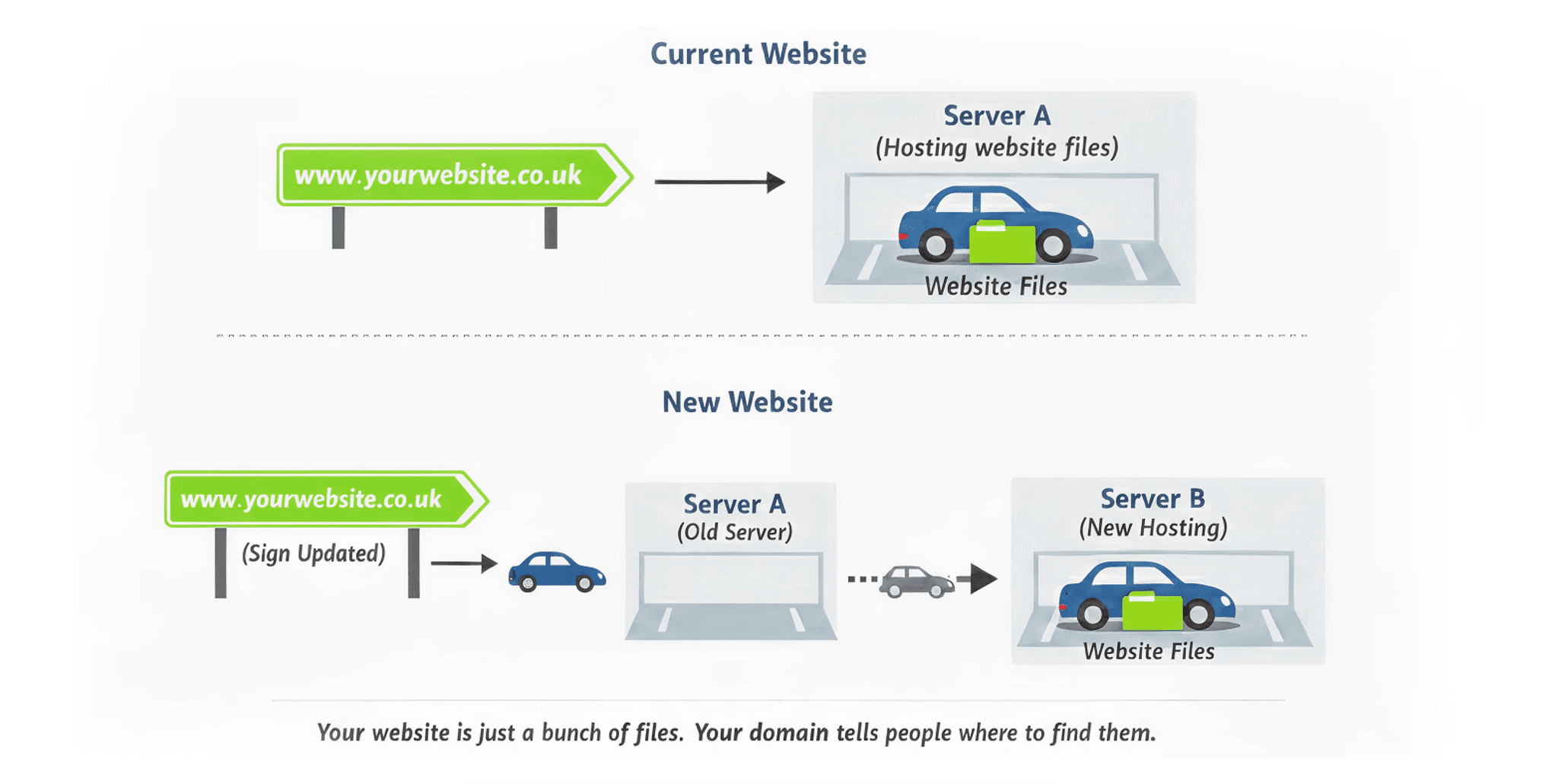
Image: Website migration car park analogy: old to new server
Your website is a collection of files (text, images, layouts, forms) all stored on a web hosting server.
You can:

Rebuild your website
Move it to better hosting
Change platforms
All without changing your domain name.
This is something we handle regularly at Make Me Local when launching new websites or improving performance - but the key point is this: the website and the domain are not the same thing.
This is where most confusion (and frustration) comes from. Your email hosting is usually a separate system again.
It might be with your domain provider, with your website host, on Microsoft 365, or on an older POP or IMAP setup (POP and IMAP are just ways your emails get delivered. POP downloads them to one device, while IMAP keeps everything in sync across all your devices - so you see the same inbox on your phone, laptop, or tablet.).
That's why:

Your website can work perfectly while emails fail
Changing one thing can accidentally affect another
Many businesses are still using older or free email setups with around 5GB of storage.
Once that fills up:
Emails stop coming in
Outgoing emails can fail
You don't always get warned
Deleting emails fixes the problem temporarily, but it doesn’t solve the underlying issue. The real-world impact is that...
Enquiry emails never arrive
Clients think you're ignoring them
Quotes and invoices don't send
That’s not a tech problem, that’s a business problem.
You don't need to understand these in detail, but it helps to know what they do.
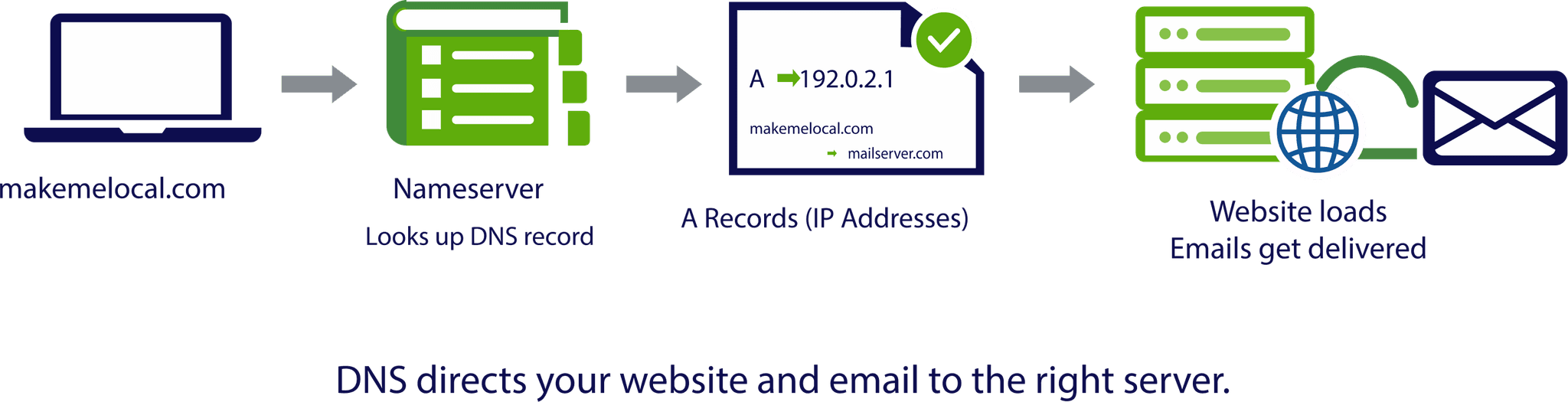
DNS is essentially the internet's direction system.
Things like A records and nameservers tell browsers and email servers:
Where your website lives
Where emails should be delivered
This is why we often ask for access to domain settings. We're not changing your website, we're updating the directions behind the scenes so everything goes where it should.
Most business owners should never need to touch this themselves. But someone has to understand it.
When businesses upgrade to Microsoft 365, it’s not just a case of ‘turning it on’. Emails have to be migrated safely, reconnected to the domain, and tested properly.
Done correctly, there’s no data loss and minimal disruption. Done poorly, emails disappear or stop working entirely.
This is why these changes need planning, and why we manage them carefully for our clients.
When domains, websites and emails aren't clearly understood:
 Leads get missedCustomers lose trustTeams get frustratedTime gets wasted chasing the wrong problem
At Make Me Local, we see these issues not as technical glitches, but as risks to your revenue and reputation.
Our job isn't just to build websites or manage emails. It's to:

Understand how everything connects
Explain it clearly
Take responsibility for the moving parts
Make sure changes don't cause knock-on problems
You don't need to know how this all works, but you should have a partner who does.
If reading this made you think, "I'm glad someone else understands this", that's completely normal.
Domains, websites and emails are three different things. They just work best when they're managed together, properly, by people who deal with this every day.

8th March 2026
Emails not arriving? When email storage fills up, messages stop without warning. Learn what happens, why deleting emails isn’t enough, and how to fix it properly.
5th March 2026
Confused about your domain and website? They’re not the same thing, and misunderstanding this can cause headaches when changing providers, updating your site, or moving hosting. Learn the key difference.
4th March 2026
Still using POP or IMAP email? Old email setups cause missed enquiries, storage issues and spam problems for growing businesses. Here’s what to do instead.
3rd March 2026
Planning a move to Microsoft 365? Learn what happens during a migration, why MX records matter, and how to coordinate with IT support to keep your emails and website running smoothly.
2nd March 2026
Confused by DNS, A records and nameservers? This plain-English guide explains what they do, why they matter, and how they affect your website and emails.
28th February 2026
Emails failing even though your website is fine? Learn why email and websites are separate systems, common causes of failure, and how to keep your inbox reliable.

Founder & CEO, Make Me Local
Nathan Kelsey is the founder and CEO of Make Me Local, a digital marketing agency helping service-based businesses grow through clarity-led strategies across AI SEO, web design, PPC, and content marketing. Since founding the agency in 2013, Nathan has grown Make Me Local into a global team serving over 300 businesses. Based in West Wickham, Kent, he is passionate about cutting through digital marketing jargon and building long-term growth partnerships with clients.